
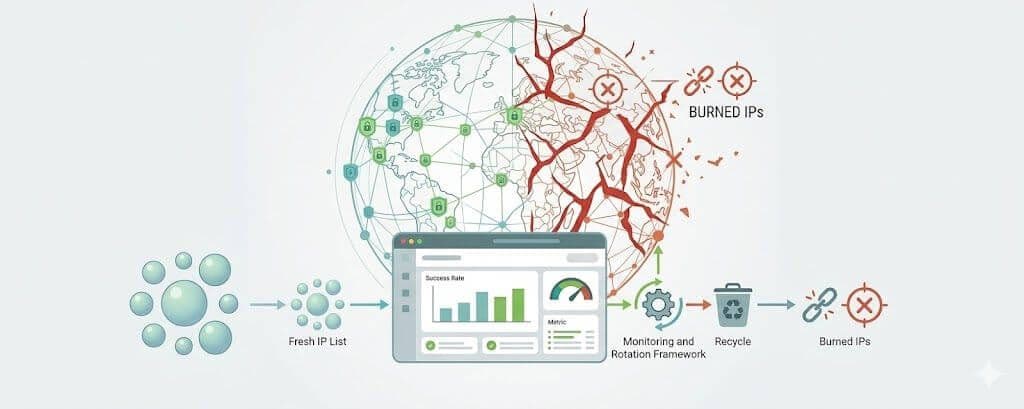
If you run scraping, rank tracking, ad verification, market intelligence, or browser automation at scale, you already know the pattern. The system does not usually fail all at once. Instead, retries start creeping up, some routes get slower, more pages come back challenged or incomplete, and success rates begin sliding just enough to create noise without immediately pointing to the real problem.
A lot of teams blame selectors, parser drift, browser settings, or target instability first. Sometimes those are involved. But in many production systems, the real issue is deteriorating proxy pool health. A portion of the pool has already started losing trust, and the system keeps routing traffic through those weaker IPs because they still look “good enough” under shallow monitoring.
That is what makes burned IPs so expensive. They rarely announce themselves with a clean failure. More often, they degrade throughput, increase retry cost, and lower data quality before anyone formally marks them as bad.
This guide explains how proxy pool health actually degrades, what a burned IP looks like in practice, which metrics matter most, how to detect early warning signs before visible success rates collapse, and how to build a health model that is useful for developers and technical teams operating real scraping systems.
If you are designing infrastructure for scraping and automation, start with InstantProxies, compare current pricing plans , and review the available proxy types to make sure your pool design matches your workload.
What proxy pool health actually means
Proxy pool health is not just whether the IPs are online.
A healthy proxy pool is one that consistently delivers:
- usable responses
- stable latency
- low challenge rates
- representative content
- predictable behavior across targets
- enough resilience under concurrency and session load
That last point matters. A pool can look healthy under light usage and still degrade badly once:
- concurrency increases
- target sensitivity rises
- sessions become longer
- search or listing routes receive more pressure
- retries begin amplifying weaker IP behavior
That is why pool health should never be reduced to “did the proxy connect?”
What a burned IP actually is
A burned IP is an IP that has accumulated enough negative trust with a target that the target starts treating it differently from a clean source.
That does not always mean an immediate hard block.
A burned IP may trigger:
- 403 or 429 responses
- CAPTCHA or JavaScript challenge pages
- slower responses
- redirect loops into block or consent flows
- partial or thin page content
- lower-quality search or listing results
- more retries to get the same outcome that cleaner IPs get on the first attempt
This is the most important operational lesson:
A burned IP is not always dead. It is often partially degraded first.
That is exactly why so many teams miss the problem.
Why burned IPs are dangerous before they are obvious
If an IP is fully blocked, the problem is at least visible.
If the IP still returns HTML, still sometimes works, and still passes a basic “status code 200” health check, it can quietly poison production for much longer.
That poisoned state creates hidden costs such as:
- rising retry volume
- higher browser CPU and memory usage
- slower queue drain
- noisier alerting
- weaker result quality
- more time wasted debugging the wrong layer
By the time the global success rate drops sharply, the pool has often been degrading the whole pipeline for days.
That is why proxy pool health should be treated as an early-detection problem, not just a post-failure metric.
Why 200 OK is not enough
A lot of proxy monitoring still relies too heavily on shallow checks such as:
- status code 200
- non-empty response body
- provider uptime
- connection success
These are useful, but they are not enough.
A 200 response does not tell you whether the IP is still returning:
- complete data
- representative rankings
- correct field coverage
- the same result set that a clean browser would receive
- a normal page instead of a quiet challenge variant
A better working definition is this:
A healthy IP consistently returns accurate, usable, target-equivalent output for the workload it is assigned to.
That is the standard developers should optimize for.
The first signs that an IP is getting burned
Burned IPs usually reveal themselves through patterns, not a single event.
The earliest warning signs often include the following.
Rising challenge rate
If a specific IP starts triggering more CAPTCHA pages, JavaScript challenges, interstitials, or suspicious redirects than the rest of the pool, trust is already slipping.
More retries per successful request
An IP that increasingly needs second or third attempts to reach the same result as cleaner IPs is already becoming less efficient.
Latency increases on the same target routes
An unhealthy IP may get throttled, delayed, or pushed into heavier verification flows. That often shows up as a rising time to first byte or slower overall page completion.
Reduced response integrity
The response may still come back, but with:
- fewer results
- missing fields
- thinner DOMs
- stale content
- generic placeholders
- lower variety in rankings or records
This is one of the most dangerous signals because many systems still count these as successful responses.
Route-specific weakness
An IP can be fine on:
- blog pages
- static pages
- light content routes
while performing badly on:
- search endpoints
- listings
- pagination
- login or checkout-like flows
- authenticated pages
That is why pool health should be tracked by route class, not just globally.
The most useful metrics for proxy pool health
If you want to detect burned IPs before visible failure, you need richer metrics.
IP-level success rate
Track success per IP, not just per provider or pool.
A provider-level average can hide several weak IPs inside an otherwise acceptable number.
Challenge rate
Measure how often an IP triggers:
- CAPTCHA pages
- JavaScript challenges
- anti-bot interstitials
- suspicious verification redirects
- challenge-heavy retries
Challenge rate is often one of the earliest signs of degradation.
Ban or friction rate
Track not just hard blocks like:
- 403
- 429
- 503
but also softer friction signals such as:
- consent loops
- login walls
- suspicious error pages
- target-specific “access denied” templates
Response integrity
This is often more valuable than raw success rate.
Track whether the response includes:
- expected fields
- expected record count
- expected DOM structure
- expected content density
- expected result quality
If an IP keeps returning weaker but technically parseable pages, it is still a pool-health problem.
Retry burden per IP
Measure how often a specific IP only succeeds after retries.
Retry dependency is one of the clearest signs that an IP is becoming expensive before it becomes obviously unusable.
Time to first bad response
How long does an IP stay clean before its first degraded result on a given target?
This is a strong operational metric because it tells you how hard an IP can be pushed before its trust starts to fall.
Endpoint-specific performance
Measure health by route type, for example:
- static content pages
- search pages
- listings
- paginated results
- account-related flows
- API-backed pages
A pool is only healthy relative to the workload using it.
A practical set of thresholds to start with
These are not universal, but they are useful starting points for a production health model.
- ban rate above 5 percent over 15 minutes: investigate
- ban rate above 10 percent over 15 minutes: quarantine candidate
- challenge rate above 2 percent on public low-friction pages: rising friction
- connection failures above 1 percent on stable targets: investigate transport or trust issues
- DOM or field completeness mismatch above 3 percent: response integrity issue
- p95 latency increase above 50 percent versus route baseline: possible mitigation or throttling
These thresholds should always be evaluated:
- per target
- per route type
- per HTTP method where relevant
- relative to historical baseline
A POST-heavy login flow and a static GET content page should not use the same expectations.
Why pool health must be target-aware
One of the biggest mistakes in proxy operations is assuming an IP is either globally healthy or globally bad.
It is usually neither.
An IP may be healthy for one target and weak for another.
It may even be healthy for one route on a target and degraded for another. For example:
- good on product pages
- weak on search
- acceptable on category pages
- bad on add-to-cart or availability checks
That is why IP health should be measured at least at the level of:
- IP
- target
- route class
- browser versus HTTP path
Without that separation, teams over-quarantine good IPs or keep weak IPs active for too long.
What causes good IPs to burn faster
Burned IPs rarely happen because of bad luck alone.
They usually happen because the system is putting too much pressure on too little trust capacity.
The most common causes include:
Too much traffic through too few IPs
If pool size does not match:
- request volume
- concurrency
- retry rate
- target difficulty
- session duration
then even good IPs will degrade quickly.
Poor session discipline
Trust falls faster when the system behaves inconsistently, such as:
- rotating too aggressively
- mismatching cookies and IPs
- changing geography mid-session
- restarting sessions unnaturally often
Using the same IPs for the hardest routes
Search, listing, and login-like flows often damage IP trust much faster than low-friction content pages.
Ignoring early friction signals
If weak IPs remain in the pool because they are not fully dead yet, they usually get burned faster and keep harming results in the meantime.
No workload separation
If the same pool handles both:
- low-risk crawling
- high-friction routes
- browser-heavy sessions
- authenticated flows
then the hardest jobs can poison the entire pool.
A practical IP health model
For developers and technical teams, it helps to classify IPs into clear operational states.
| IP State | Meaning | Action |
|---|---|---|
| Healthy | Clean output, low challenge rate, stable latency | Keep active |
| Watchlist | Early degradation signals, higher retries, small integrity drift | Reduce load and monitor closely |
| Quarantined | Repeated anomalies, higher challenge rate, lower-quality output | Remove temporarily from production |
| Burned | Confirmed hard blocks or repeated low-trust behavior | Retire, cool down, or replace |
This is much better than treating all “working” IPs as equally good.
Canary checks are one of the best early-warning tools
A canary is a controlled request or page you expect to behave consistently.
Examples include:
- a known product page
- a stable category page
- a branded search query with predictable output
- a controlled account or test environment page in an authorized workflow
Run these regularly across the pool.
If one subset of IPs starts:
- seeing more challenges
- returning thinner pages
- losing fields
- drifting in latency or completeness
then you have evidence that the issue may be IP health rather than selector or parser logic.
Canaries are one of the best ways to detect burned IPs before general success metrics visibly collapse.
A practical workflow for detecting burned IPs early
A production-ready workflow should look something like this.
1. Instrument every request consistently
Log at least:
- timestamp
- target
- route class
- IP or proxy identifier
- status code
- latency
- response size
- challenge flag where detectable
- integrity or completeness signal
Synthetic health checks should use the same telemetry structure.
2. Normalize targets and identifiers
Make sure you can group by:
- IP
- subnet
- ASN if available
- target domain
- route pattern
- geography
Without stable keys, health analysis gets noisy very quickly.
3. Run lightweight active checks
Use deterministic probes against stable pages or endpoints on a schedule.
These should be lightweight enough not to become noise themselves.
4. Compute rolling windows
Useful windows include:
- 5 minutes
- 15 minutes
- 60 minutes
This helps catch both fast burn and slow degradation.
5. Score IPs continuously
Blend metrics such as:
- hard block rate
- challenge rate
- retry burden
- latency delta
- response integrity mismatch
Start simple, then refine.
6. Quarantine suspicious IPs automatically
Do not wait for a human to notice every weak performer.
7. Revalidate after cooldown
Some IPs recover. Some do not. Measure before reintroducing them.
8. Feed production outcomes back into the model
Synthetic checks catch early drift. Real traffic shows business impact. You need both.
A simple scoring approach teams can start with
You do not need a complex machine-learning model first.
A simple weighted score can work well.
For example:
- start each IP at 100
- subtract weight for ban rate
- subtract weight for challenge rate
- subtract weight for connection failures
- subtract weight for latency penalty
- subtract weight for integrity mismatches
Then define thresholds such as:
- score below 80 for one hour: watchlist
- score below 70 for 15 minutes: quarantine candidate
- repeated drops below 70 across several windows: burned or replace
The exact weights should be tuned per target class. The important part is not elegance. It is consistency and actionability.
How to quarantine without overreacting
Not every weak IP should be discarded immediately.
A strong system uses graduated response:
- soft quarantine for one target
- reduced load assignment
- cooldown period
- reassignment to lower-risk validation work
- re-test before returning to production
This prevents both of the common mistakes:
- burning weak IPs even faster by overusing them
- throwing away recoverable IPs too early
Why observability matters more than more proxies
A bigger pool does not solve weak monitoring.
Without IP-level observability, a large pool just hides problems longer.
A strong monitoring layer should make it easy to answer:
- which IPs are weakening first
- which routes are burning them fastest
- which subnets or geographies are degrading together
- whether the issue is trust, transport, or parser-related
- whether retries are solving the problem or amplifying it
This is how proxy pool health becomes an engineering system rather than guesswork.
Distinguishing burned IPs from other failure modes
Not every drop in success rate is a burned-IP problem.
You should be able to separate:
- IP reputation problems
- client fingerprint problems
- payload or CSRF issues
- browser-environment drift
- network path instability
A quick comparison approach helps.
| Symptom | More likely cause | Fast validation |
|---|---|---|
| Same request fails across many IPs | Client or browser issue | Test in a real browser or different client family |
| Same target fails only on some IPs | Burned IPs or subnet-specific trust issue | Replay with a fresh IP |
| GET works but POST fails | Payload, session, or CSRF problem | Compare against browser-captured request |
| CAPTCHAs rise without full blocks | Soft trust degradation | Compare challenge rate across IPs and routes |
| Latency rises before blocks | Target-side throttling or low-trust handling | Compare p95 by IP and route |
That distinction saves a lot of wasted debugging time.
Common mistakes that keep pools unhealthy
Measuring only provider uptime
Provider availability is not the same as pool health.
Trusting 200 responses too much
A 200 response can still carry degraded data.
Over-rotating on first error
One failure is noise. Use windows and patterns.
Using one pool for every workload
Hard and easy targets should not always share the same infrastructure.
No target-specific quarantine
An IP weak on Site A may still be fine on Site B.
No canary checks
Without stable reference requests, silent degradation is harder to catch.
A practical checklist for proxy pool health
Use this checklist when auditing a production pool.
- measure health per IP, not only per provider
- track challenge rate, not just hard blocks
- measure response integrity and completeness
- separate metrics by target, route class, and method
- classify IPs into healthy, watchlist, quarantined, and burned states
- run canary checks regularly
- segment pools by workload difficulty
- reduce pressure on weak IPs early
- monitor retry burden and time to first bad response
- optimize for trustworthy output, not just request success
Frequently asked questions about proxy pool health
What is a burned IP in simple terms?
It is an IP that has lost enough trust with a target that it now produces more blocks, more challenges, lower-quality responses, or weaker results than a healthy IP.
Does a burned IP always return 403 errors?
No. Many burned IPs still return HTML, but the output is degraded or less representative.
What is the earliest useful warning sign?
Challenge rate, retry burden, and falling response integrity are often earlier than full hard failure.
Should weak IPs be removed immediately?
Not always. Watchlist and quarantine states are usually better than instant permanent removal.
What improves pool health fastest?
Track IP-level metrics, segment workloads, quarantine suspicious IPs early, and stop treating all routes and targets as equal.
Healthy pools are measured, not assumed
The strongest scraping systems do not assume a pool is healthy because requests are still flowing. They measure which IPs are actually returning clean, complete, representative output and they isolate weaker IPs before visible failure spreads across the system.
That is the real value of a proxy pool health model. It helps you detect burned IPs while they are still a contained problem instead of waiting until they become a pipeline-wide outage.
If your team is building higher-volume scraping or automation workflows, pair that IP-level observability with the right network foundation from InstantProxies, compare current pricing plans , and review the available proxy types so your pool design matches the pressure your workload actually creates.