
What the dashboard proxy test is for
The dashboard proxy test is a built-in tool that allows you to quickly check whether your assigned proxies are responding and available. It provides a fast way to validate connectivity without needing to run external commands or configure a separate environment.
This test is useful as an initial checkpoint before moving into deeper testing or integration.
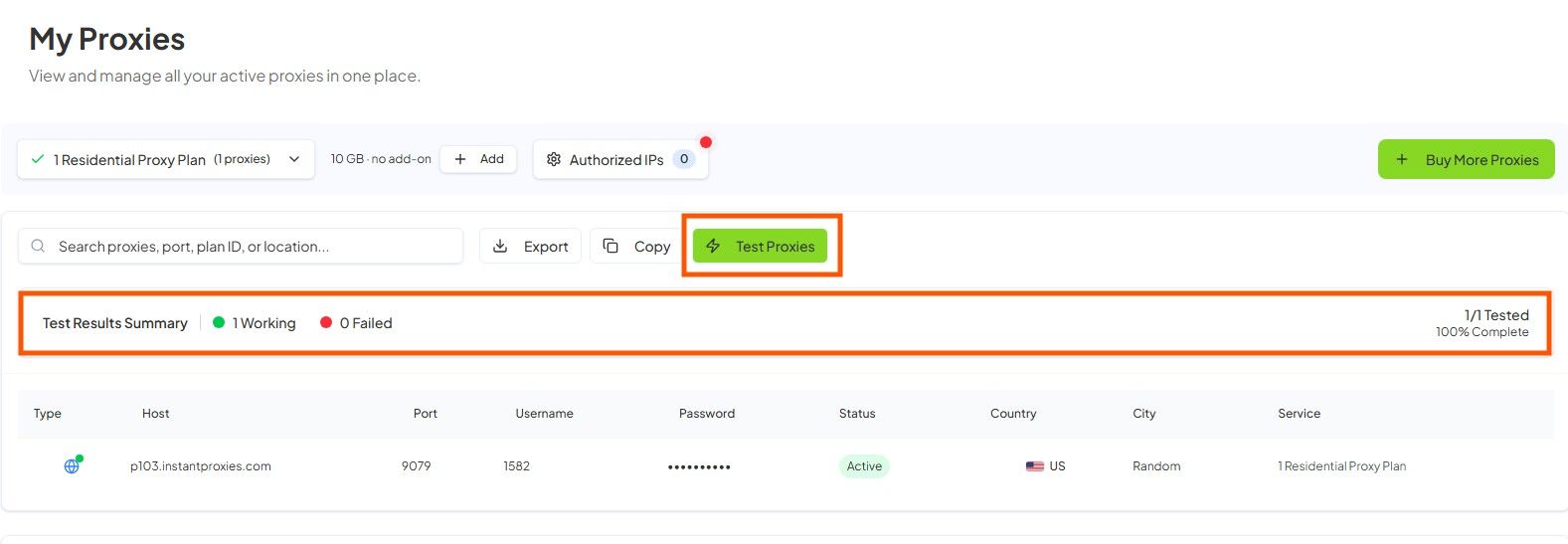
When to use dashboard testing
Dashboard testing is helpful in several situations:
- During your first setup to confirm proxies are active
- For quick validation without leaving the dashboard
- When checking if a proxy is online
- When narrowing down whether an issue is local or service-related
It serves as a convenient first step in the troubleshooting process.
What the dashboard test can confirm
The dashboard test can verify basic functionality of your proxies, including:
- Endpoint responsiveness
- Basic availability
- Whether your assigned proxies are online
These checks help confirm that the proxy service itself is reachable.
What the dashboard test cannot fully confirm
While useful, the dashboard test has limitations and does not guarantee full integration success:
- It does not confirm that your application is configured correctly
- It does not verify that your browser or tool is routing traffic through the proxy
- It does not guarantee success for specific destination websites or workflows
Additional testing is required to validate real-world usage.
Recommended order of testing
For a complete setup validation, follow this sequence:
- Start with the dashboard test to confirm basic availability
- Perform a cURL test to validate request-level behavior
- Use connection verification to confirm routing
- Integrate the proxy into your application or workflow
This approach helps isolate issues at each stage.
How to interpret common results
Understanding test results can help you diagnose issues more effectively:
-
Online in dashboard, but application fails
- Indicates that the proxy is working, but your application configuration may need adjustment
-
Fails in dashboard and in cURL
- Suggests a potential service issue or incorrect setup such as authentication or IP authorization problems
-
Passes in dashboard, but browser appears direct
- Likely means your browser or tool is not properly routing traffic through the proxy
Best next actions based on results
Depending on your test outcome:
- If the dashboard test fails, verify your authentication method or service status
- If the dashboard test passes but external tests fail, review your configuration or environment
- If results vary across tools, isolate the issue by testing one method at a time
Taking a step-by-step approach helps identify the exact point of failure.
Next step
After testing your proxies in the dashboard, proceed to First Request with cURL to validate your setup at the request level. Then use Verify Your Connection to confirm that your traffic is properly routed through the proxy. If issues persist, refer to Network Status and Incident Interpretation to check for broader service-related conditions.